Why APRS Connect starts from the Messages tab
Many APRS clients open on a map, and there are good reasons for that: APRS grew up around position reports, and a map is where those make sense. APRS Connect opens on the Messages tab instead. This post is for anyone weighing the app against a map-first client, and for anyone curious why it is laid out this way. It sets out the reasons behind the choice, what follows from it, and what it costs.
None of this is an argument that map-first clients are wrong. They serve many operators well, and if position reports are most of what you do with APRS, one of them may fit you better.
One thread per station
The Messages tab holds conversations: one thread per station, kept in order. That is the shape of a messaging app, and it is used here because an APRS message exchange is a conversation. Scattering those lines through a packet feed, or hanging them off a map marker, loses the order and the pairing that make them readable.
A thread header shows when the station was last heard and its distance and bearing from you, or "Not heard yet" when the app has nothing to base a figure on. Inside a thread there is an unread boundary line and day dividers.
Threads come in five kinds, and the list can filter by any mix of them:
- Direct: conversations with another station.
- Services: automated bots such as WHO-IS or the email gateway.
- Bulletins: broadcasts to everyone in range, collected into one room per group.
- SMS: text messages carried by the SMS gateway.
- Groups & Nets: rooms carried by ANSRVR, such as #APRSThursday.
The distinction that matters most is Services against the rest: machines against people. Each service has one callsign and one conversation, so one filter covers all of them.
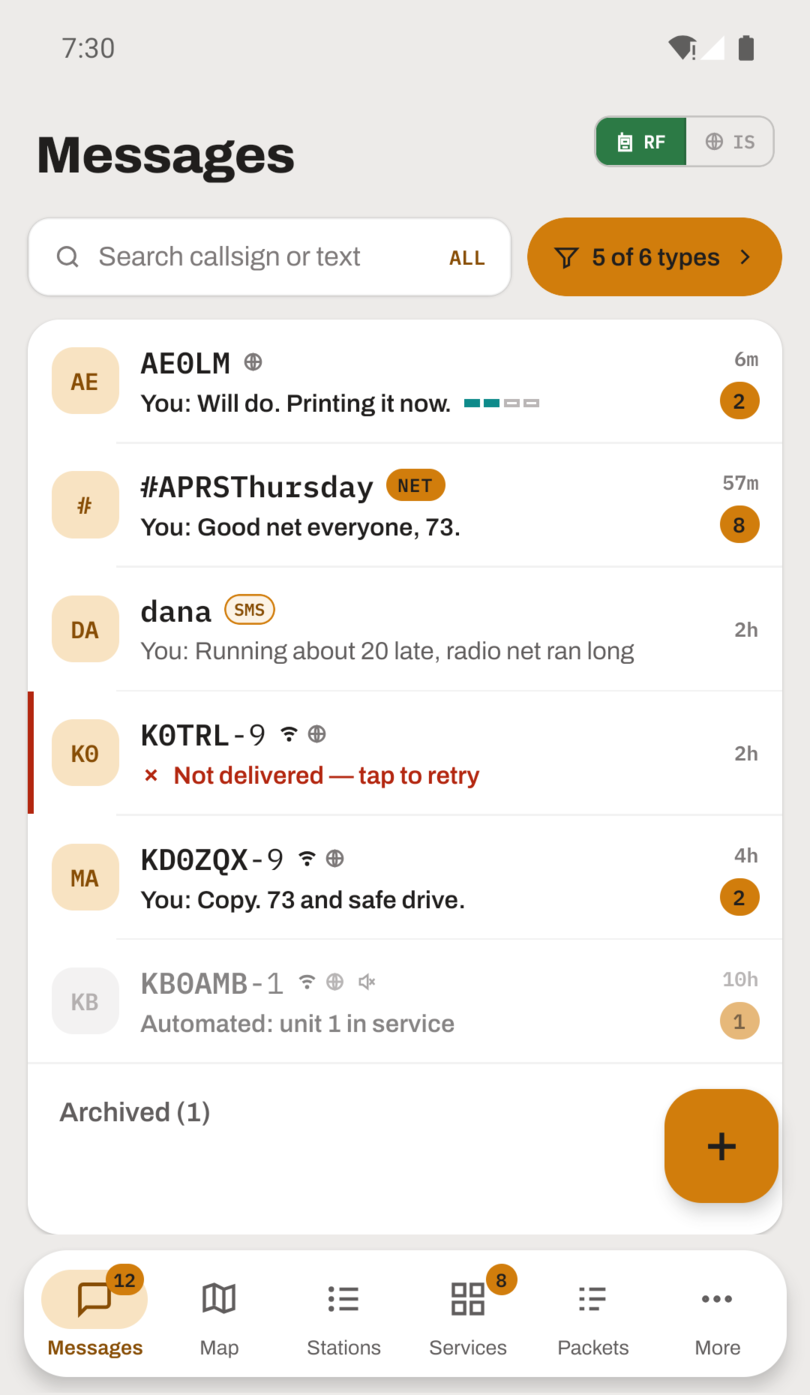
One conversation per station, with people, bots, bulletin groups and nets in one list.
Delivery state is a fact, not an assumption
Every message you send carries one of six states, and each has a precise meaning:
| State | Meaning |
|---|---|
| Queued | Waiting for the channel |
| Sent | Handed to the radio or APRS-IS, not yet proof it was radiated |
| Digipeated | Your own packet came back through a repeater, proof it went out over the air |
| Delivered | The recipient acknowledged it |
| Rejected | The recipient explicitly refused it |
| Not delivered | Every attempt failed |
The ladder is built so that the app never claims more than it has evidence for. "Sent" stops at the hand-off; "Digipeated" is earned by matching the app's own packet as it comes back through a digipeater. The message screen lists every copy that went out, each with its time and whether it went by radio, by APRS-IS, or both.
Stop a message mid-retry and the app tells you what actually happened: stopped in time, a copy already went out, a digipeater repeated it, or it was already delivered. A guessed status would be worse than none, because you would act on it.
Services are stations you talk to
The Services tab is a directory of 22 APRS service bots, each presented as a guided screen: what it does, who runs it, and a form for each command. The idea behind it is that a service is something you talk to. It has a callsign, you send it a message, it answers. The bot's command syntax is an interface, and the app acts as the front end to it, so nobody has to memorise syntax to ask WXBOT for a forecast.
Two rules keep that arrangement honest. The exact packet each button will send can always be shown before it goes: turn on Show APRS commands in Settings and service screens show the full command first, because it transmits under your callsign. And you can always type a command by hand instead. The guided screen is a convenience, never the only way in.
Replies from a service thread back into the Messages tab like any other conversation, with the same delivery tracking. A reply from WHO-IS is a message from a station, and it belongs where messages are.
The packet log underneath
The Packets tab is the raw feed: every frame the app hears, over the radio or from APRS-IS, stored and shown live. Tap any packet and it is taken apart field by field, with the path drawn as a graph that marks which digipeaters actually repeated it and which hops were internet routing.
The message screen reads its list of transmitted copies back from this log. A trail point on the map links to the packet behind it while that packet is still in the log. When something looks wrong anywhere else in the app, the packet log is usually where the answer is, and that only works because the other screens are views onto one record rather than separate stores of their own.
Packets that fail to decode are flagged and kept, never hidden. When the app itself was not receiving, a RECEPTION PAUSED row appears inline saying how long reception was down and why, so a gap does not read as a quiet band.
What this costs on the map side
Putting messages first means the map is one tab among five, not the whole app. The Map tab is a full map: real APRS symbols with their overlay characters, trails you can tap for the time, position and speed at each point, follow-me from GPS or your last beacon, animated digipeater paths, and an offline tile cache. But it is reached by a tap, and it is not where you land.
If your APRS is mostly watching mobiles move and reading weather stations, that is a real cost, and a map-first client puts that picture on screen the moment it opens. Here you open the app, see whether anyone has written to you, and go to the map when you want it. The two arrangements answer different first questions, "where is everyone?" against "did anyone answer?", and APRS Connect is built around the second.
One thing softens the cost: the map, the Stations tab and the packet log share a single view filter: an age window, RF or internet origin, the channels to include, and station type. Set it once and every view shows the same picture.
Where to read more
- Messaging: threads, delivery states, and retries.
- APRS services: the directory and the guided screens.
- Packet log: the raw feed and the packet inspector.
- Map: what the map draws.