What's new in APRS Connect 1.8.0
APRS Connect 1.8.0 is on Google Play. It is the first release where the phone can put other people's packets on the air. Here is everything in it, with a short post on each feature and the documentation page behind it.
IGate
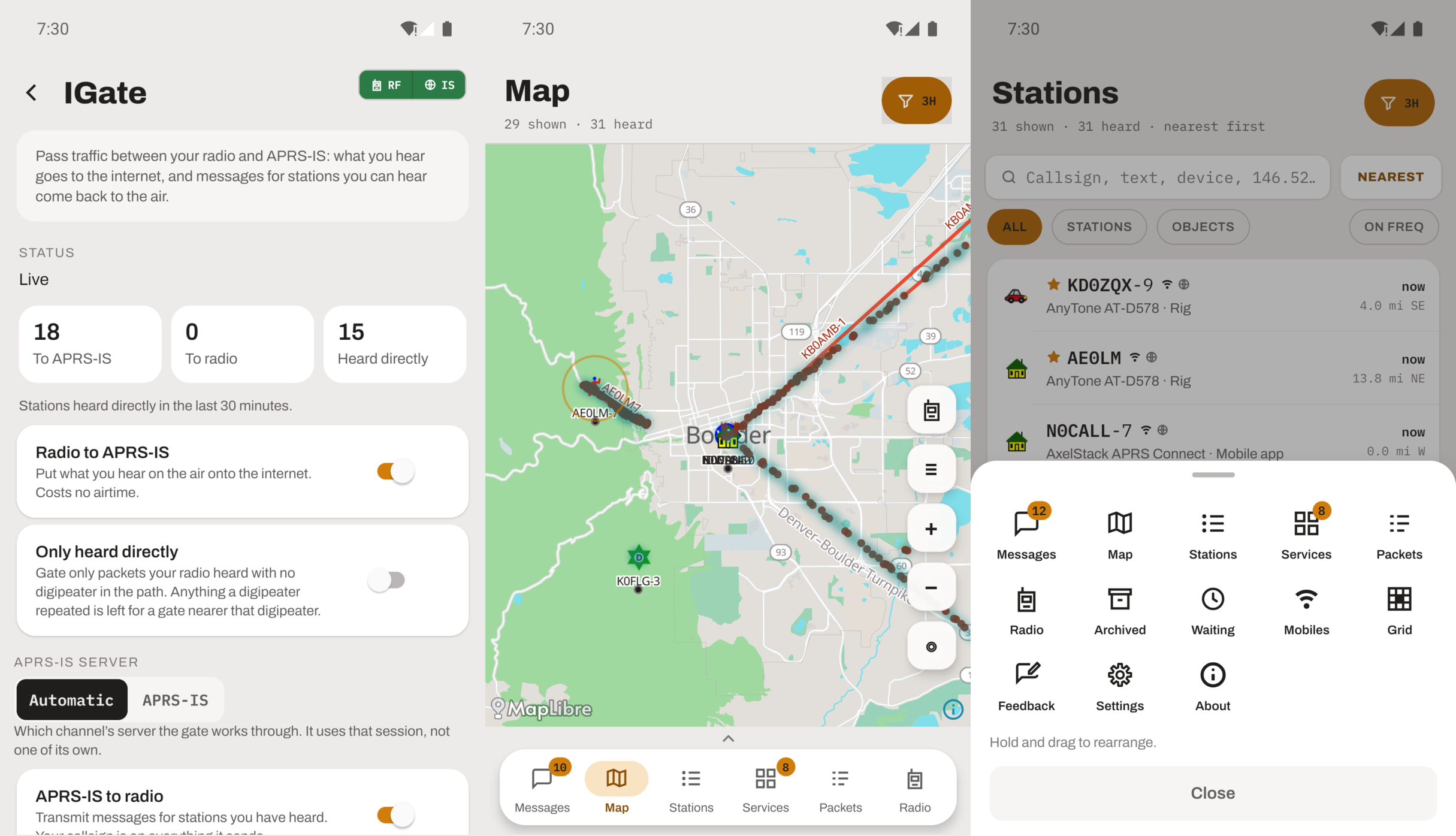
The phone can pass traffic between your radio and APRS-IS. The two directions are separate switches: radio to internet costs no airtime and can be narrowed to packets heard direct; internet to radio transmits only for stations your radio has heard directly in the last 30 minutes. Bulletins are never transmitted, positions go out only for callsigns you list, and RFONLY, NOGATE and TCPIP are honoured in both directions. Part of APRS Connect Pro.
Post: Your phone as an IGate. Documentation: IGate.
Digipeater
The phone can repeat what the radio hears back onto the air, as a fill-in or a wide-area digipeater. A fill-in waits five seconds and stays quiet if another digipeater repeated the packet first, so it fills holes rather than doubling everything the hilltop already carried. Custom rules cover regional aliases and cross-band repeats, and a set of rules nothing on the settings screen can override keeps it from looping, repeating internet traffic, or answering a WIDE7-7. Part of APRS Connect Pro.
Post: A digipeater that waits its turn. Documentation: Digipeater.
Digipeater coverage map
A heat map on the map tab of the places a transmitter has provably reached a digipeater from. Only me is built from your own beacons coming back with a digipeater's mark on them. Everyone is every station the app has heard. Every station's card offers Coverage of that station, which draws one digipeater's footprint. The coverage has been recording on every install since you installed the app, whether or not you had Pro, so switching it on shows history rather than a blank map. Part of APRS Connect Pro.
Post: Where your signal has actually reached a digipeater. Documentation: Map, digipeater coverage.
Pinned stations
Tap the star on a station's page and it sorts to the top of the Stations list. While you are on APRS-IS its packets reach you wherever it goes, without having to be inside your range filter. The view filter has a Pinned stations row that narrows the map, the list and the packet log to your starred stations. A pin never notifies and does nothing in the background. Free.
Post: Pinned stations. Documentation: Stations, pinned stations.
Grid squares
A Grid square screen with your own six-character Maidenhead locator, large enough to read out and with a copy button, plus the distance and bearing from it to any other locator or any callsign the app has heard. Everything is worked out on the phone with no connection. Long-press the map and the sheet gives you that point's locator too. Free.
Post: Your grid square, and the distance to any other. Documentation: Grid squares.
A tab bar you arrange
The More menu is gone. Swipe up on the tab bar and a drawer shows every screen in the app, with the six on the bar as its top row. Drag any tile onto another and the two swap. Whatever is in the first cell is the screen the app opens on. The order is saved on the phone and included in a backup.
Post: The tab bar is yours to arrange. Documentation: Getting started, where things live.
Also in this release
- Two APRS OTA replies that the badge counted but no screen could show now appear where they belong.
- Mobile alerts, which arrived in 1.7.0, are called Mobiles nearby everywhere.
Free and Pro
Pinned stations, grid squares and the arrangeable bar are free. The IGate, the digipeater and the coverage map are part of APRS Connect Pro, alongside the radio channels they need. The full split is on the free and Pro page.
The version on the About screen tells you which build you are running. If you are on 1.7.0, the update is on Google Play now. New here? Get APRS Connect here.